



Simple view keeps only what most owners do every week: add a tenant, see who hasn’t paid, record a payment and send a reminder. Nothing is deleted: the rest is one tap away.
Turn it on
- Tap your initials (top right) to open the account menu.
- Choose Simple view: bigger text, just the basics.
New accounts also see Turn on Simple view on the dashboard.
What you see
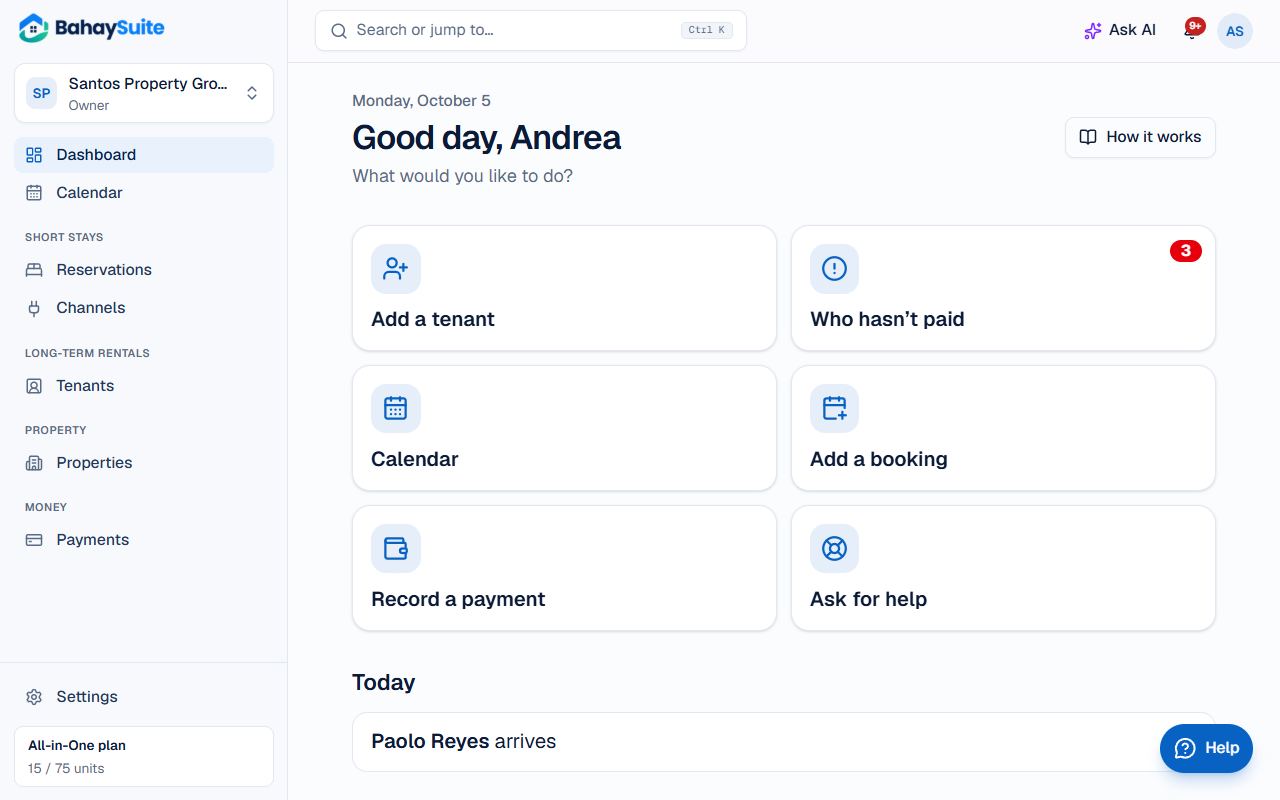
- Bigger text on every page.
- A short menu: Home, Tenants, Payments and Properties, plus Calendar, Reservations and Channels if you take nightly stays.
- Big buttons on Home: Add a tenant, Who hasn’t paid, Record a payment and Ask for help.
- Your tenants: each shows what they owe in red, or Paid up in green, with Record a payment and Remind right on their card.
Record a payment
- On Home, find the tenant and tap Record a payment.
- It already shows what the payment is for (their oldest unpaid charge) and the amount. Tap Change to pay something else.
- Check the amount and the date, choose how they paid (Cash, GCash…), and tap Record payment.
Turn it off
Tap Show everything at the bottom of Home, or choose Show everything (Simple view off) in the account menu. You can switch back any time.