



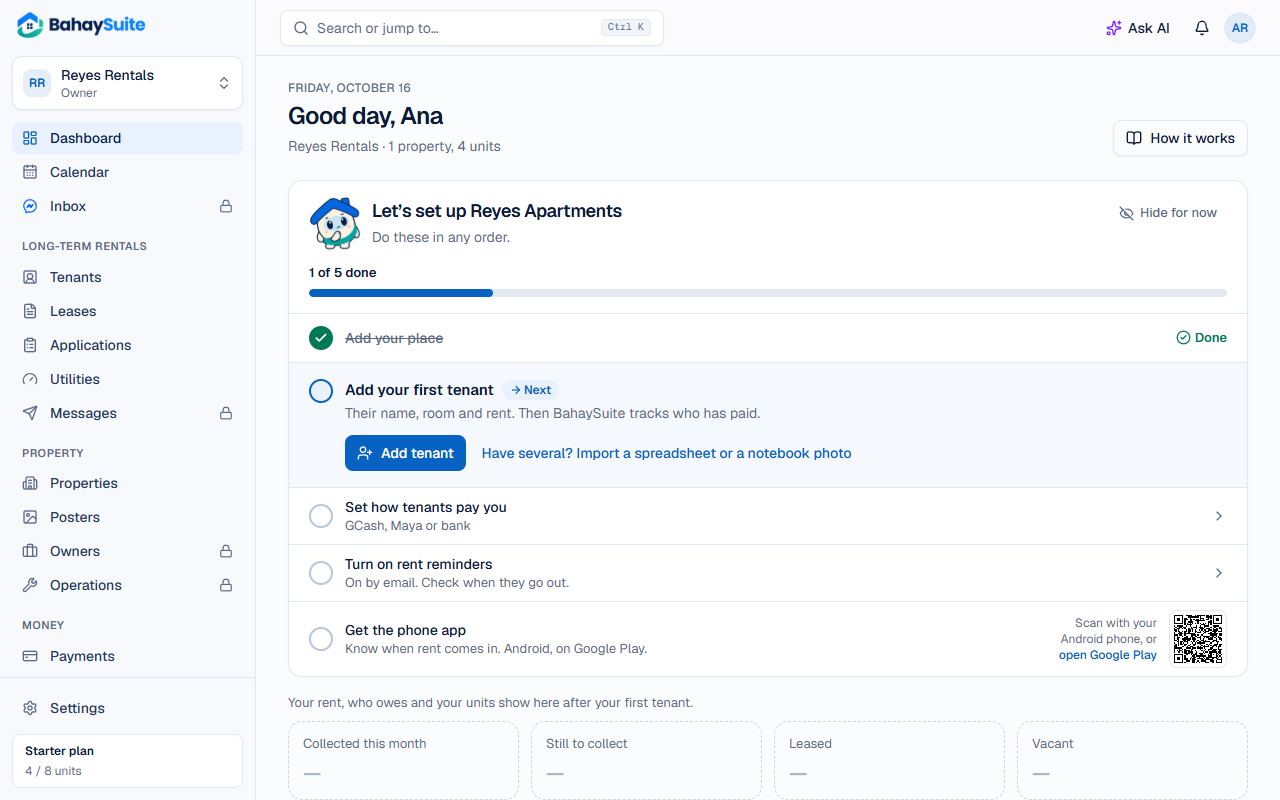
Your Dashboard has a Get set up card that ticks itself off as you go, the same list as on the phone app’s Home: tick a step on one and it’s ticked on the other. The steps change depending on whether you rent out monthly units, short stays, or both. Do them in any order; the next one is open with its button.
The steps
- Add your place. Every room, condo unit or house you rent out. You did the first one when you signed up; add the rest under Properties.
- Monthly rentals: add your first tenant. Their name, room and rent; rent charges and reminders start from the lease. Have several? Import them from a spreadsheet or a notebook photo. See Add a tenant and lease.
- Set how tenants pay you (in the Philippines). Your GCash, Maya or bank accounts and their QR codes, so pay links show where to send money. See Get paid by GCash, bank or QR Ph.
- Turn on rent reminders. They’re on by email from the start; open Settings → Payments to check when they go out.
- Short stays: connect your Airbnb or Booking.com calendar, add a booking, and turn on your booking site. See Sync your Airbnb and Booking.com calendars.
- Get the phone app. On a computer, scan the code with your Android phone to open Google Play, then sign in with the same email. In the app, the last step is turning on alerts for that phone.
On your phone
BahaySuite works in your phone’s browser, and you can install it like an app to get notifications for new bookings and payments. See Install BahaySuite on your phone.